Mike Language Reference
Introduction
Mike is a declarative language for specifying data models and user interfaces. It provides a convenient and expressive way to define database schemas, entity relationships, and UI components.
This document serves as a comprehensive reference for the Mike language, covering all aspects of its syntax, features, and usage.
For an introduction to the Mike language, see the Guide.
General information
Overview
Below is an outline of the logical structure in which declarations and attributes may be used. It is intended as an aid for ease of reference, and is not meant to be fully precise or comprehensive on its own. (Many parts of the below syntax, such as certain keywords, are optional and may be omitted. For full details on each keyword and attribute, consult the Keywords and attributes section.)
Notations and conventions:
...is a placeholder signifying “any number of these may be provided here”, and is not actual Mike syntax.THIS|THATsignifies that either one or the other alternative may be written in that position, and is also not actual Mike syntax.For the meaning of
memberPathandreferencePath, see the Paths section.(The remainder are hopefully self-explanatory.)
data {
    entity PascalCaseName
        @unique(memberName...)
        @indexed(memberName...)
        @display("Text {0}", memberPath...)
        @userAccount
        @external
    {
        member camelCaseName: TypeName|TypeName!|[EntityName]
            @many
            @mandatory
            @mappedBy(memberName)
            @unidirectional
            @primary
            @unique
            @indexed
            @value(CREATED_AT|CREATED_BY|MODIFIED_AT|MODIFIED_BY|DELETED_AT|DELETED_BY|IS_DELETED|COMPUTED)
            @default(value)
            @title("Text")
    }

    enum PascalCaseName: Int|String
        @external
    {
        case SCREAMING_SNAKE_CASE_NAME
            @storedAs(number|"Text")
            @display("Text")
    }
}

ui {
    navigation PascalCaseName
        @heading("Text {0}", referencePath...)
    {
        item PascalCaseName: PageName using referencePath
            @icon("fas:icon-name")
            @title("Text")
        {
            item ...
        }
    }

    page PascalCaseName requires EntityName as camelCaseName
        @home
        @layout(HORIZONTAL|VERTICAL|VSPLIT|TABBED)
        @title("Text")
        @heading("Text {0}", referencePath...)
    {
        container PascalCaseName
            @layout(HORIZONTAL|VERTICAL|VSPLIT|TABBED)
            @title("Text")
            @heading("Text {0}", referencePath...)
        {
            container, table, details, form ...
        }

        table PascalCaseName: EntityName using referencePath
            @omitted(CREATE|DELETE|EDIT|VIEW)
            @readonly
            @createPage(PageName)
            @editPage(PageName)
            @viewPage(PageName)
            @searchBar(memberPath...)
            @searchBarDefault("Text")
            @hiddenFilters
            @title("Text")
            @heading("Text {0}", referencePath...)
        {
            column camelCaseName: memberPath
                @sorted(ASC|DESC, number)
                @hidden
                @link(PageName)
                @prefix("Text")
                @suffix("Text")
                @display("Text {0}", memberPath...)
                @title("Text")
        }

        details PascalCaseName: EntityName using referencePath
            @omitted(EDIT|DELETE)
            @readonly
            @editPage(PageName)
            @title("Text")
            @heading("Text {0}", referencePath...)
        {
            field camelCaseName: memberPath
                @link(PageName)
                @prefix("Text")
                @suffix("Text")
                @display("Text {0}", memberPath...)
                @title("Text")
        }

        form PascalCaseName: EntityName using referencePath
            @omitted(DELETE)
            @title("Text")
            @heading("Text {0}", referencePath...)
        {
            input camelCaseName: memberName
                @placeholder("Text")
                @link(PageName)
                @prefix("Text")
                @suffix("Text")
                @display("Text {0}", memberPath...)
                @title("Text")
        }
    }
}
Grammar
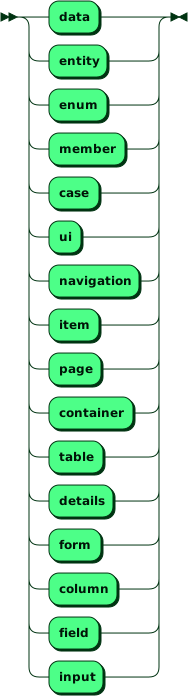
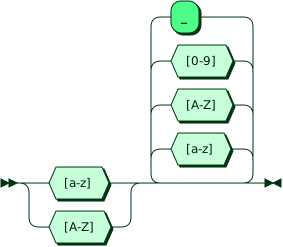
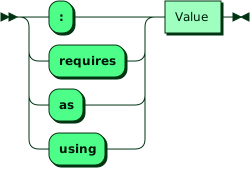
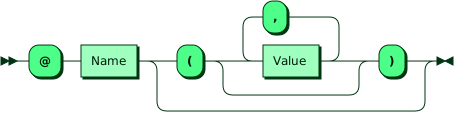
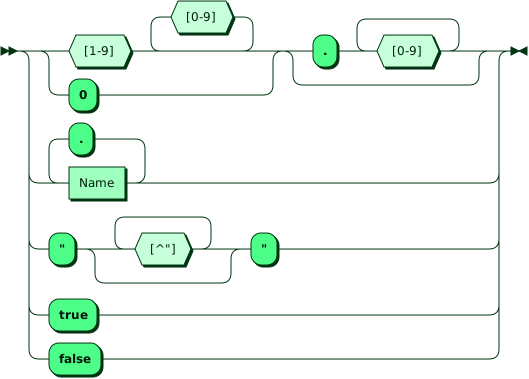
Every part of a Mike descriptor follows the same general structure of keyworded declarations with optional @attributes, nested hierarchically.
Without accounting for whitespace and comments, the grammar for that structure is as follows:
Declaration:

DeclKeyword:
Name:
Specifier:
Attribute:
Value:
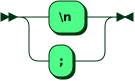
Separator:
Some specific points to observe:
The declaration keyword, the name, or both may be optional (depending on the declaration’s kind), but at least one of the two must always be present.
Declarations must be separated by either new lines or semicolons (
;).
Additional rules:
Arbitrary whitespace may be added between most grammatical elements.
No whitespace is permitted between
@and the attribute’s name.Declarations may be freely split into multiple lines.
Indentation is not checked or enforced.
Comments begin with a
#character and continue to the end of the line.Keywords may not be used as names. These include the declaration keywords, the specifier keywords,
true,false, and the reserved keywordsgalleryandgroup.
And depending on the specific kind of declaration, further rules apply:
Whether the keyword is required.
Whether a name is required.
Which naming convention must be followed.
Which so-called specifiers are allowed or required (
: ...,using ...,requires ... as ...) and their specific form.What attributes are available and their parameters.
Which kinds of declarations are permitted as children.
These are specified in the keywords and attributes section as well as in the overview.
Built-in types
The following built-in types are supported by Mike. They may be used to store primitive values in the members of an entity.
Bool
A boolean type with two possible values, true and false.
Date
A local date without time zone information. Literals are written as an ISO 8601 formatted string, such as "2012-12-21".
DateTime
Represents a point in time as the combination of a date, time, and time zone.
Literals are written as an ISO 8601 formatted string, such as "2012-12-21T12:34:56Z" (UTC) or "2012-12-21T12:34:56+07:00" (UTC+7).
Float
A floating-point number, such as 3.1459.
In generated Java code it is represented by the Double type, not Float.
Negative numeric literals cannot currently be written.
Int
A 32-bit integer.
Negative numeric literals cannot currently be written.
String
A Unicode string. Three forms are available: normal strings, raw strings, and template strings. Normal strings and raw strings may be written anywhere a string is expected. Template strings may only be written where a template string is specifically expected.
A normal string literal is written in the form "Normal String". Escaping is not currently supported: any character except for newlines and " itself may be used in the string’s body.
The case sensitivity of String-typed member values depends on the database management system settings. The default PostgreSQL database used by the generated code is case sensitive, but this can be changed by specifying the table column’s collation method.
Raw strings
Raw string literals may be used in all of the same places as normal string literals. They are written between triple quotes: """Raw String""". Anything other than a sequence of three " characters may be used in the string’s body.
The string’s body may consist of multiple lines. Leading indentation is not removed.
If used where a template string is expected, interpolations are not expanded: writing """{0}""" results in the string’s contents being literally {0}.
Template strings
Certain attributes - @display, @heading - make use of template strings.
A template string is like a normal string, except placeholders ({0}, {1}, ...) may be used in the string’s body, which will be replaced at runtime by the contents of the members or paths specified as additional arguments to the attribute. If one of those arguments has no value (is null) at runtime, it is replaced instead by a hyphen (-).
Example: @display("First name: {0} Last name: {1}", person.firstName, person.lastName)
Rules for placeholders:
Placeholders are numbered starting from 0.
Using the same number more than once is permitted, and both occurrences will expand to the same text.
Using numbers out of order, for example
"{1} {0}", is permitted.Skipping numbers (in the whole string), such as
"{0} {2}", is not permitted.The
{and}characters may not be used in the string except as part of the placeholder syntax.
Rules for additional arguments:
There must be at least as many additional arguments to the attribute as the highest placeholder number. (More is permitted, but redundant, and results in a warning.)
Using zero placeholders and zero additional arguments is also permitted (but may or may not be practically useful, depending on the attribute).
The names and references that may be used in the additional arguments depends on the specific attribute.
Nested member accesses, also known as paths are supported, such as
person.firstNamein the above example.The type of each argument (i.e., of its final component, if the argument is a path) may be a built-in primitive type or an
enumtype, but not anentitytype.Members having a
@manyattribute may not be used in any argument or path component.
UUID
A UUID is a universally unique identifier. UUID literals are written as string literals consisting of 32 hexadecimal digits, separated by hyphens into five groups with lengths 8-4-4-4-12, for example: "d3e1f83d-8dd2-4a28-9622-c3be6d6df104".
User
Each user account in the deployed application is represented by an instance of the User entity type. It has the following definition:
entity User {
    id: UUID @primary
    username: String! @unique
    email: String! @unique
}
(In the generated application’s database, further properties are associated with each user account, such as a password and privileges. These are not currently accessible at the Mike descriptor level.)
The id, username, and email members may be used in the same way as any other members with the same definition would (for example, in columns, fields, or @display), except that they may not be used in the inputs of a form; and furthermore, the User type itself may not be used as the type of a create-mode form. (New user accounts can be created, and their built-in members can be modified, through a predefined user management page in the generated application.)
In any position where a reference path is expected, the currently logged-in user can be referred to using the syntax User.CURRENT.
The built-in User type is not available if the security option in config.yaml is set to "NONE", or if an entity is manually declared with the @userAccount attribute (in which case that entity takes over the role of representing user accounts, instead).
Reserved built-in type names
The names Blob, File, Image, and JSON are reserved for future use and (as with other built-in type names) may not be used as the name of a user-defined type.
Other general rules
Declaration order
The order of declarations in a file does not affect their visibility for name resolution. Declarations from later in the file may be freely referenced, and forward declarations are not necessary.
The order of declarations may be relevant for other reasons, including the resulting order of declarations in the corresponding generated code.
Naming conventions
Depending on the kind of declaration, one of three naming conventions must be followed (this is specified in the documentation for each keyword):
PascalCase names must begin with an uppercase letter, and must not contain more than two consecutive uppercase letters, nor more than one at the end of the name. They may contain upper- and lowercase letters and numbers, but not underscores.
camelCase names are the same, except they must begin with a lowercase letter.
SCREAMING_SNAKE_CASE names may contain uppercase letters, numbers, and underscores. They may not contain lowercase letters, leading underscores, trailing underscores, or multiple consecutive underscores.
Only the ASCII character set (a-z, A-Z, 0-9, _) may be used in names. Unicode names are not currently supported.
Name conflicts
Declaration names within a scope must be unique. The extent of that scope (whether a child declaration’s name may conflict with a parent’s, for example) varies by the kind of declaration, and is specified in the documentation for each keyword.
Many kinds of declarations allow the name to be omitted, in which case a default name is assigned automatically for use in the generated code. And in some cases (such as action pages), an entire declaration may be created automatically, including a default name. In both of these cases, two principles apply:
The uniqueness check happens afterwards: it’s possible for a manually specified name to conflict with a default name, or for two default names to conflict with each other.
Default names are only for use in the generated code, and cannot be referenced from within the descriptor itself. (To reference such a declaration, it is suggested to specify an explicit name for it first.)
Braces and parentheses
For attributes which accept any number of parameters (known as variadic attributes), an empty parameter list -- @attr() -- is mandatory when zero arguments are supplied.
For other attributes, including attributes that do not accept any parameters (known as flag attributes) and attributes with optional parameters, an empty parameter list is not permitted, and @attr is the only supported form.
(This is to more clearly distinguish intent: configuring a feature to use zero parameters, versus enabling a feature.)
For declarations which allow but do not require children, an empty set of braces, { }, is optional.
As a special case, they are always required for data { } and ui { } (albeit such declarations are not very useful, and have no effect).
For declarations which do not support children, an empty set of braces is discouraged, and reported as a warning.
Attributes
In most cases, specifying multiple attributes with the same name for a given declaration is not permitted. For attributes where this is explicitly permitted, it is mentioned in their documentation.
The @title attribute may technically be used on all UI declarations, however, there are some where it has no useful effect. In such cases, a warning will be reported, and it is not listed among the supported attributes in the documentation.
Paths
In certain positions (such as a using clause or the arguments of @display), a chain of member accesses such as department.manager.name, known as a path, may be specified.
There are two varieties, with the one that is accepted depending on the particular position:
In a member path, the first name in the path, known as the root, is itself the name of a
member. Theentitywhosemembers may be used as the path root depends on the given context.In a reference path, the root may itself have one of two forms:
The name of a
page-local parameter introduced with arequires ... as ...clause. Its type is theentitytype specified withrequires.User.CURRENT, which refers to the currently logged-in user and has typeUser. Or, if anentityhas been declared with the@userAccountattribute, then thatentitytakes the place ofUserin this context. (This feature is not available ifsecurityhas been set to"NONE"in config.yaml.)
In all cases, if a path component has a given entity type, then a subsequent .myMember access may refer to the members of that entity. (Such chained accesses are never required: a single member or page-parameter is also a valid path.)
The type of a path is the type of its last component. Alongside its type, a path is also considered to have a quantity (or cardinality), which is determined as follows:
If any of the members in the path have a
@manyattribute, its quantity is “many” (representing zero or more values).Otherwise, if all of the members have a
@mandatoryattribute, then its quantity is “mandatory” (representing exactly one value).Otherwise, its quantity is “optional” (representing zero or one value).
The quantity of a
page-parameter is also “optional”.The quantity of
User.CURRENTis considered “mandatory”, since there is always a logged-in user.
Action pages
The table and details declarations support so-called action pages, which may be either declared manually or created automatically.
There are three kinds:
Create pages, which can be customized with
@createPage, or disabled with@omitted(CREATE). Supported only bytable.Edit pages, which can be customized with
@editPage, or disabled with@omitted(EDIT). Supported bytableanddetails.View pages, which can be customized with
@viewPage, or disabled with@omitted(VIEW). Supported only bytable.
If a supported action page is neither customized with the corresponding @actionPage attribute, nor disabled using @omitted, then a default action page is created and used automatically. Only one default action page will be created per combination of action (create, edit, view) and entity type, and if it is needed by multiple components, they will use the same one.
The @link attribute also creates a default view page if no explicit page parameter is specified for it.
For an entity named Person, the default action pages would have the following forms:
page PersonCreatePage @heading("Create new item") {
    form PersonCreateForm: Person
}

page PersonEditPage requires Person as person @heading("Editing item") {
    form PersonEditForm: Person using person
}

page PersonViewPage requires Person as person @heading("Viewing item") {
    details PersonDetails: Person using person @editPage(PersonEditPage)
}
Notably:
The
inputs andfields will be the default ones for the givenentity. See the documentation forformanddetails.Each view page also has an edit page, and for the default view page, it will be the default edit page. That is, if one writes a
tablewith for example@omitted(CREATE) @omitted(EDIT), this still results in both a default view page and (consequently) a default edit page being created.
The names of pages are required to be distinct not only from other pages, but also from all container, table, details, and form declarations within each page. This is relevant with regards to the default action pages: in the case of the above example, it means that any page named PersonCreateForm, PersonEditForm, or PersonDetails would result in a name conflict error, as would any container, table, details, or form named PersonCreatePage, PersonEditPage, or PersonViewPage (hopefully, this limitation is not too burdensome).
Keywords and attributes
Conventions for keywords
Parents | Which declaration keywords this one may be used directly within |
Children | Which declaration keywords may be used directly within this one |
Braces | Whether |
Attributes | Which |
Base specifier | The meaning and requirements of the declaration’s |
Keyword | Whether the keyword is a required part of the syntax |
Name | Whether the declaration’s name is a required part of the syntax |
Default name | How the default name for the declaration is determined, if the name is optional and omitted |
Naming convention | Which naming convention must be followed by the name of the declaration |
Name conflicts with | Which other declarations in which positions must not have the same name as this one |
Guide | Link to section of the Guide documentation that introduces this feature. |
Conventions for attributes
Restrictions | What additional rules need to be followed by the declaration this attribute is used on |
Parameters | What parameters may or must be provided when using this attribute |
Parentheses | Whether |
Multiple copies | Whether multiple instances of this same |
Default | What the default behavior would be if this attribute is not applied to a given declaration |
Conflicts | Which other attributes would result in a conflicting attributes error if used together with this one |
Guide | Link to section of the Guide documentation that introduces this feature. |
data
Parents | - |
Children |
|
Braces | Required |
Attributes | - |
Base specifier | N/A |
Keyword | Required |
Name | Disallowed |
Default name | N/A |
Naming convention | N/A |
Name conflicts with | N/A |
Guide |
The data model can be declared within the data { ... } block.
Any number of separate data blocks may be declared, which has the same effect as if they had been combined into a single data block.
entity
Parents |
|
Children |
|
Braces | Required |
Attributes |
|
Base specifier | N/A |
Keyword | Optional |
Name | Required |
Default name | N/A |
Naming convention | PascalCase |
Name conflicts with | Other |
Guide |
Defines a database entity type (table at the SQL level). At least one member must be specified within the body.
@unique on entity
Restrictions | - |
Parameters | one or more |
Parentheses | Required |
Multiple copies | Allowed |
Default | - |
Conflicts |
|
Guide |
Adds a uniqueness constraint to the entity, which may be either single-member or composite. A single-member constraint is equivalent to applying a @unique attribute directly to the member itself. A composite constraint means that the combination of member values must be unique among all instances of the entity type.
Additional rules:
Redundant constraints are diagnosed as an error. Two constraints are redundant if the arguments of one are a subset of the arguments of the other.
Specifying the same argument multiple times in the same constraint is diagnosed as an error.
@indexed on entity
Restrictions | - |
Parameters | one or more |
Parentheses | Required |
Multiple copies | Allowed |
Default | - |
Conflicts |
|
Guide |
Adds a database index to the entity, which may be either single-member or composite. A single-member index is equivalent to applying an @indexed attribute directly to the member itself.
Additional rules:
Redundant indexes are diagnosed as a warning. An index is redundant with another index or constraint if has the same arguments in the same order. (Note that
@primary,@unique, and@indexedon amemberare equivalent to single-argument forms of that attribute on the containingentity.)Specifying the same argument multiple times in the same index is diagnosed as an error.
@display on entity
Restrictions | - |
Parameters | A template string of member paths originating in this |
Parentheses | Required |
Multiple copies | Disallowed |
Default |
|
Conflicts | - |
Guide |
Specifies the textual form that an entity instance will be displayed as in the UI, for example in the column of a table. The argument string is added to the language resource files.
Though not required, a @display attribute should always be provided whenever Int @primary or UUID @primary is used, because in that case, the default would be an auto-generated value that is not meaningful for end users.
@userAccount on entity
Restrictions | - |
Parameters | - |
Parentheses | Disallowed |
Multiple copies | Disallowed |
Default | - |
Conflicts |
|
Guide |
Designates this entity as being the one that represents user accounts in the generated application, instead of the built-in User type. Most of the key properties of the User type will now attach to this entity type instead. (The entity may be given any name that is normally allowed, including User: this does not lead to a conflict, as it replaces the built-in type.)
Three members are implicitly added to the entity:
id: UUID @primary
username: String! @unique
email: String! @unique
For all intents and purposes, the effect is the same as if they had been written manually. (If another member is declared with the name email, it will result in a duplicate name error; if another @primary member is declared, it will result in a conflicting attributes error.) These members may be used in all of the usual ways (for example, in columns, fields, or @display), except that they may not be used in the inputs of a form. Furthermore, the entity type itself may not be used as the type of a create-mode form. (New user accounts can be created, and their built-in members can be modified, through a predefined user management page in the generated application.)
Any additional manually declared members of the entity may not be made @mandatory unless they have a @default, since the built-in user management page doesn’t know about these members and couldn’t otherwise initialize them.
In any position where a reference path is expected, the currently logged-in user can be referred to using the syntax EntityName.CURRENT, where EntityName is the name of the entity with the @userAccount attribute.
(This attribute may be used even if the security option in config.yaml is set to "NONE", although in this case, its only significant effect will be to add the id, username, and email members.)
@external on entity
Restrictions | - |
Parameters | - |
Parentheses | Disallowed |
Multiple copies | Disallowed |
Default | - |
Conflicts | - |
Guide |
This attribute may be useful for integrating Mike-generated code with pre-existing code. If it is applied to an entity, Mike will assume that a type with that definition already exists in the code base, and will not generate code for it. When using this attribute, it should be ensured that the existing code for the type is actually compatible with what Mike would have generated for it based on the entity declaration.
member
Parents |
|
Children | - |
Braces | Discouraged |
Attributes |
|
Base specifier | The type of the |
Keyword | Optional |
Name | Required |
Default name | N/A |
Naming convention | camelCase |
Name conflicts with | Other |
Guide |
Adds (equivalently) a field or member to a database entity type or a column to a database table. At least one member must be present in each entity.
A member with the same type as its containing entity, or mutually recursive references between multiple entity declarations, are allowed, but if every member in the cycle is @mandatory, this is diagnosed as an error, because an instance of the entity or entities would be impossible to construct.
For each declared member, an entry is added to the language resource files. The source string may be specified with @title, or will be the member’s name converted to “Sentence case” otherwise. These strings are used for column titles and field and input labels in the UI.
The case sensitivity of String-typed member values depends on the database management system settings. The default PostgreSQL database used by the generated code is case sensitive, but this can be changed by specifying the table column’s collation method.
Syntax sugar
Writing
member memberName: Type!is equivalent to writingmember memberName: Type @mandatory. See@mandatory.Writing
member memberName: [Type]is equivalent to writingmember memberName: Type @many. See@many.
Attribute compatibility overview
This table gives an overview of which attributes may be used together with which others on the the same member.
@many | @mandatory | @mappedBy | @unidirectional | @primary | @unique | @indexed | @value | @default | |
|---|---|---|---|---|---|---|---|---|---|
@many | 🚫 | ❌ | ✅ | ✅ | 🕳 | ❌ | ❌ | ❌ | 🕳 |
@mandatory | ❌ | 🚫 | ❌ | ✅ | ✅ | ✅ | ✅ | ❎ | ✅ |
@mappedBy | ✅ | ❌ | 🚫 | ❌ | 🕳 | ❌ | ❌ | ❌ | 🕳 |
@unidirectional | ✅ | ✅ | ❌ | 🚫 | 🕳 | ✅ | ✅ | ✅ | 🕳 |
@primary | 🕳 | ✅ | 🕳 | 🕳 | 🚫 | ❌ | ⚠ | ❌ | ❌ |
@unique | ❌ | ✅ | ❌ | ✅ | ❌ | 🚫 | ⚠ | ❗ | ❌ |
@indexed | ❌ | ✅ | ❌ | ✅ | ⚠ | ⚠ | 🚫 | ✅ | ✅ |
@value | ❌ | ❎ | ❌ | ✅ | ❌ | ❗ | ✅ | 🚫 | ❗ |
@default | 🕳 | ✅ | 🕳 | 🕳 | ❌ | ❌ | ✅ | ❗ | 🚫 |
Legend
| ✅ | OK |
| ❌ | Error |
| ⚠ | Warning |
| ❎ | Depends on parameters: OK in most cases, error in some. |
| ❗ | Depends on parameters: error in most cases, OK in some. |
| 🚫 | Error if the same attribute is used multiple times. |
| 🕳 | N/A: there is no overlap between the set of member types each attribute is supported on. |
@many on member
Restrictions |
|
Parameters | - |
Parentheses | Disallowed |
Multiple copies | Disallowed |
Default | - |
Conflicts |
|
Guide |
Indicates that an instance of this entity (the member’s parent) is associated with not one, but potentially multiple instances of the other entity (the member’s type). If @mappedBy is not also specified, this results in a separate relation table being created. In a programming language, it is analogous to the member storing a Set<EntityType> rather than a simple EntityType. An alternative [Type] form is also available as syntax sugar.
@mandatory on member
Restrictions | - |
Parameters | - |
Parentheses | Disallowed |
Multiple copies | Disallowed |
Default | - |
Conflicts |
|
Guide |
Specifies that the value of the member cannot be absent or null. Equivalent to “NOT NULL” in SQL. An alternative Type! form is also available as syntax sugar.
@mappedBy on member
Restrictions |
|
Parameters | A |
Parentheses | Required |
Multiple copies | Disallowed |
Default | - |
Conflicts |
|
Guide |
Specifies that this member should be used as a virtual inverse mapping of the relation defined by the other member which is used as its argument. A member with @mappedBy(exampleMember) is considered to contain exactly those entity instances at runtime whose exampleMember member contains a reference to this entity instance. No database tables or columns are created for @mappedBy members; they are solely a higher-level convenience.
Additional rules:
If the target
member(used as the argument) is@unique, then thismembermust not be@many.And conversely, if the target
memberis not@unique, then thismembermust be@many.A
@mappedBymember may not be present in composite@unique(...)constraints at theentitylevel.A
@mappedBymember may not target another@mappedBymember.
@unidirectional on member
Restrictions |
|
Parameters | - |
Parentheses | Disallowed |
Multiple copies | Disallowed |
Default | - |
Conflicts |
|
Guide |
If two entitys each have a member whose type is the other entity, and neither member has a @mappedBy or @unidirectional attribute, this is diagnosed as a warning: in this case, it is not obvious whether the user intended to define a single relation and its inverse mapping, or two completely separate relations. In this respect, @unidirectional can be understood as meaning “intentionally not @mappedBy”, except it only needs to be written explicitly in the aforementioned ambiguous circumstances.
@primary on member
Restrictions |
|
Parameters | - |
Parentheses | Disallowed |
Multiple copies | Disallowed |
Default | - |
Conflicts |
|
Guide |
Specifies the member that serves as the primary key for the entity type, uniquely identifying its instances. There must be exactly one member that is @primary within each entity.
If a member is @primary, it is implicitly considered @mandatory as well, but both attributes may also be written explicitly.
An Int-typed @primary member’s value is always auto-incremented, and an UUID-typed @primary member’s value is always auto-random. These members may not be used as inputs in a form.
Composite primary keys aren’t currently supported. If a composite primary key would be logically appropriate, it is suggested to declare an auxiliary id: UUID @primary or id: Int @primary member instead, and apply a composite @unique(...) constraint to the members that would have formed the composite primary key.
@unique on member
Restrictions | - |
Parameters | - |
Parentheses | Disallowed |
Multiple copies | Disallowed |
Default | - |
Conflicts |
|
Guide |
Requires that the value of this member must be globally unique across all instances of the given entity type in the database. It is equivalent to writing @unique(memberName) at the entity level.
Applying @unique to multiple members results in multiple separate uniqueness constraints. To specify a composite constraint, use @unique on entity.
Redundant constraints are diagnosed as an error. A @unique attribute on a member is redundant with a @primary attribute on the same member, while @unique(...) attributes on the entity are redundant with @unique attributes on any of the argument members.
@indexed on member
Restrictions | - |
Parameters | - |
Parentheses | Disallowed |
Multiple copies | Disallowed |
Default | - |
Conflicts |
|
Guide |
Enables database indexing for a member. Equivalent to writing @indexed(memberName) on the entity.
Applying @indexed to multiple members results in multiple separate database indexes. To request a composite index, use @indexed on entity.
Redundant indexes are diagnosed as a warning. An @indexed attribute on a member is redundant with a @primary or @unique attribute on the same member, and with single-argument @indexed or @unique attributes specifying the same member at the entity level.
@value on member
Restrictions |
|
Parameters |
|
Parentheses | Required |
Multiple copies | Disallowed |
Default | - |
Conflicts |
|
Guide |
Specifies that a member’s value should be filled in automatically in particular ways, rather than provided by the end user.
Apart from COMPUTED, each possible parameter of @value may be used at most once in a given entity.
CREATED_ATrecords the timestamp when theentityinstance is created. Thememberis implicitly considered@mandatoryas well.CREATED_BYrecords theUser(or other@userAccountentity) who created theentityinstance. Thememberis implicitly considered@mandatoryas well.MODIFIED_ATrecords a timestamp whenever theentityinstance is created or modified. Thememberis implicitly considered@mandatoryas well.MODIFIED_BYrecords the activeUser(or other@userAccountentity) whenever they create or modify theentityinstance. Thememberis implicitly considered@mandatoryas well.DELETED_ATrecords the timestamp when theentityinstance is soft-deleted or otherwise deactivated. Themembermay not also be@mandatory.DELETED_ATrecords theUser(or other@userAccountentity) who soft-deleted or otherwise deactivated theentityinstance. Themembermay not also be@mandatory.IS_DELETEDimplies that thememberis also@mandatoryand@default(false), and its value will be overwritten withtruewhen theentityinstance is soft-deleted or otherwise deactivated.COMPUTEDspecifies that themember’s value may not be entered by the end user, but will be automatically computed by the software in some way. Such amembermay not be used informs. If used together with@mandatory, a@defaultattribute must also be specified.
A member with a @value other than COMPUTED may not be used in composite @unique constraints at the entity level.
If the security option has been set to "NONE" in config.yaml, then the CREATED_BY, MODIFIED_BY, and DELETED_BY parameters are not available.
@default on member
Restrictions |
|
Parameters | The name of a |
Parentheses | Required |
Multiple copies | Disallowed |
Default | - |
Conflicts |
|
Guide |
Specifies a default value that will be stored in the member when one is not provided by the end user.
The @default attribute may be used even if the member is not @mandatory. In this case, the value specified in the parameter will be used as the default value instead of null.
Single-member @unique constraints on the entity conflict with @default on that member, but composite constraints do not.
@title on member
Restrictions | - |
Parameters | A string literal |
Parentheses | Required |
Multiple copies | Disallowed |
Default |
|
Conflicts | - |
Guide |
Specifies a default title for the given member, which will appear in the UI as column titles and field and input labels on elements that refer to this member if they don’t have their own separate @title specified. The argument will be used as the source string for the member’s name in the language resource files. (Even if this string appears in many places in the UI, only one shared entry is created in the language resource files.)
If @title is not specified, then the default will be the components of the camelCase member name translated into “Sentence case”, so for example, firstName will become "First name" and lastName will become "Last name".
enum
Parents |
|
Children |
|
Braces | Required |
Attributes |
|
Base specifier | Optional; the storage type of the |
Keyword | Required |
Name | Required |
Default name | N/A |
Naming convention | PascalCase |
Name conflicts with |
|
Guide |
Declares an enumerated type consisting of one or more possible cases. The storage type is String by default if not explicitly specified. At least one case must be specified within the body.
For each declared case, an entry is added to the language resource files. The source string may be specified with @display, or will be the case’s name converted to “Sentence case” otherwise. These strings are used as the displayed contents of columns, fields, and inputs in the UI.
@external on enum
Restrictions | - |
Parameters | - |
Parentheses | Disallowed |
Multiple copies | Disallowed |
Default | - |
Conflicts | - |
Guide |
This attribute may be useful for integrating Mike-generated code with pre-existing code. If it is applied to an enum, Mike will assume that a type with that definition already exists in the code base, and will not generate code for it. When using this attribute, it should be ensured that the existing code for the type is actually compatible with what Mike would have generated for it based on the enum declaration.
case
Parents |
|
Children | - |
Braces | Discouraged |
Attributes |
|
Base specifier | N/A |
Keyword | Optional |
Name | Required |
Default name | N/A |
Naming convention | SCREAMING_SNAKE_CASE |
Name conflicts with | Other |
Guide |
Specifies a possible value of an enumeration type. At least one must be specified in each enum.
For each declared case, an entry is added to the language resource files. The source string may be specified with @display, or will be the case’s name converted to “Sentence case” otherwise. These strings are used when displaying a case’s value in the UI, for example, in a cell of a table.
As a forwards compatibility restriction, the name of a case may not be IS_NULL or NOT_NULL.
@storedAs on case
Restrictions |
|
Parameters | An integer or string literal, depending on the |
Parentheses | Required |
Multiple copies | Disallowed |
Default |
|
Conflicts | - |
Guide |
Specifies the database representation of the given case.
Additional rules:
If the storage type is
Intand@storedAsis specified for onecase, then it must be specified for all of thecases in theenum.Each
@storedAsvalue in anenummust be distinct.If the storage type is
String, explicitly and implicitly determined values must also be distinct from each other, i.e. the argument of@storedAsmust not be the name of anothercasewithout@storedAs.
@display on case
Restrictions | - |
Parameters | A string literal |
Parentheses | Required |
Multiple copies | Disallowed |
Default |
|
Conflicts | - |
Guide |
Specifies the textual representation of this case which is displayed in the UI e.g. when the type of a table’s column is this enum. The argument will be used as the source string for the case’s name in the language resource files.
If @display is not specified, then the default will be the components of the SCREAMING_SNAKE_CASE case name translated into "Sentence case".
ui
Parents | - |
Children |
|
Braces | Required |
Attributes | - |
Base specifier | N/A |
Keyword | Required |
Name | Disallowed |
Default name | N/A |
Naming convention | N/A |
Name conflicts with | N/A |
Guide |
The UI model can be declared within the ui { ... } block.
Any number of separate ui blocks may be declared, which has the same effect as if they had been combined into a single ui block.
navigation
Parents |
|
Children |
|
Braces | Optional |
Attributes |
|
Base specifier | N/A |
Keyword | Required |
Name | Optional |
Default name |
|
Naming convention | PascalCase |
Name conflicts with | All |
Guide |
Used to specify the elements and structure of the navigation menu in the web UI. At most one navigation may be declared within a Mike descriptor.
@heading on navigation
Restrictions | - |
Parameters | |
Parentheses | Required |
Multiple copies | Disallowed |
Default | - |
Conflicts | - |
Guide |
Adds a heading element to the navigation’s UI with the specified text. Typically, it will be the name of the company or organization. The argument string is added to the language resource files.
(In this context, the only reference paths available for use in a template string are those beginning with User.CURRENT.)
item
Parents |
|
Children |
|
Braces | Optional |
Attributes |
|
Base specifier | Optional, the |
Keyword | Optional |
Name | Optional |
Default name |
|
Naming convention | PascalCase |
Name conflicts with | Other |
Guide |
Defines a menu item within a navigation menu. Items may specify a link to a page, child items in a submenu, or both. (Or neither, which is not particularly useful, and will be diagnosed as a warning.) Items may be nested to arbitrary depth.
An optional using clause may also be specified using the syntax item ItemName: PageName using referencePath. In this case, the page specified with PageName must have a requires clause of the same type as the type of the reference path specified with using, and the using path must have non-@many cardinality. (In this context, the only available reference paths are those beginning with User.CURRENT.) When the end user clicks on the navigation item, the value retrieved from the path will be passed as a parameter to the page. If the value is not retrievable at runtime, e.g. because the value of a path component is null, the item will be omitted from the navigation menu; or, if it also has children, it will be present but not clickable.
Conversely, if a using clause is not provided, then the page specified with item ItemName: PageName must not have a requires clause.
@icon on item
Restrictions | - |
Parameters | The FontAwesome name of an icon as a string literal |
Parentheses | Required |
Multiple copies | Disallowed |
Default | - |
Conflicts | - |
Guide |
Specifies the icon to be displayed for a navigation menu item. If no icon with the specified name exists, an “X” icon is displayed instead.
@title on item
Restrictions | - |
Parameters | A string literal |
Parentheses | Required |
Multiple copies | Disallowed |
Default | The |
Conflicts | - |
Guide |
Determines the name of the menu item as displayed in the UI. The argument string is added to the language resource files.
For technical reasons, the string used here is a template string, although no valid interpolations are available for it in this context. This means { and } characters may not be used in the string.
page
Parents |
|
Children |
|
Braces | Optional |
Attributes |
|
Base specifier | N/A |
Keyword | Required |
Name | Required |
Default name | N/A |
Naming convention | PascalCase |
Name conflicts with |
|
Guide |
Declares a page that can be navigated to within the UI. The @home page is displayed initially, and other pages can be navigated to through menu items and the @createPage, @editPage, @viewPage, and @link attributes.
An optional requires ... as ... clause may be specified following the page’s name, where the first component is the name of an existing entity and the second is an arbitrary camelCase name. This defines a parameter for the page that will be passed to it in the generated code whenever the page is navigated to. Within the page, the parameter may be used in the paths specified for the using clauses of tables, detailses, and forms, as well as in the arguments of @heading attributes.
@home on page
Restrictions |
|
Parameters | - |
Parentheses | Disallowed |
Multiple copies | Disallowed |
Default | If no pages have |
Conflicts |
|
Guide |
Specifies that this page is the home page, i.e., the page to be displayed immediately after login.
@layout on page
Restrictions | If |
Parameters |
|
Parentheses | Required |
Multiple copies | Disallowed |
Default |
|
Conflicts | - |
Guide |
Please refer to @layout on container. A page can be thought of as having an implicit top-level container.
@title on page
Restrictions | - |
Parameters | A string literal |
Parentheses | Required |
Multiple copies | Disallowed |
Default | The contents of |
Conflicts | - |
Guide |
Determines the page’s title as displayed in a browser title bar or tab name. The argument string is added to the language resource files.
For technical reasons, the string used here is a template string, although no valid interpolations are available for it in this context. This means { and } characters may not be used in the string.
@heading on page
Restrictions | - |
Parameters | |
Parentheses | Required |
Multiple copies | Disallowed |
Default | - |
Conflicts | - |
Guide |
Adds a heading element to the page’s UI with the specified text. The argument string is added to the language resource files.
container
Parents |
|
Children |
|
Braces | Optional |
Attributes |
|
Base specifier | N/A |
Keyword | Required |
Name | Required |
Default name | N/A |
Naming convention | PascalCase |
Name conflicts with |
|
Guide |
A container element that can be used to hold any number of child elements in a specified @layout. Layouts and structures of greater complexity can be created by nesting containers within each other.
@layout on container
Restrictions | If |
Parameters |
|
Parentheses | Required |
Multiple copies | Disallowed |
Default |
|
Conflicts | - |
Guide |
Specifies the layout that the child elements of the container (or page) will be arranged according to.
HORIZONTAL: Elements are arranged next to each other horizontally.VERTICAL: Elements are arranged above and below each other vertically.VSPLIT: The two child elements are arranged next to each other horizontally, with a splitter bar in between that can be dragged to adjust their sizes.TABBED: Each child element becomes a tab in a tabbed view, with the tab’s title being the@titleof that element.
@title on container
Restrictions | - |
Parameters | A string literal |
Parentheses | Required |
Multiple copies | Disallowed |
Default | The contents of |
Conflicts | - |
Guide |
Determines the title of the tab containing this container element, if this container is the child element of a page or another container with a @layout(TABBED) attribute. The argument string is added to the language resource files.
If the parent element does not have a TABBED layout, then this attribute has no effect, and its use is diagnosed as a warning.
For technical reasons, the string used here is a template string, although no valid interpolations are available for it in this context. This means { and } characters may not be used in the string.
@heading on container
Restrictions | - |
Parameters | |
Parentheses | Required |
Multiple copies | Disallowed |
Default | - |
Conflicts | - |
Guide |
Adds a heading element to the container’s UI with the specified text. The argument string is added to the language resource files.
table
Parents |
|
Children |
|
Braces | Optional |
Attributes |
|
Base specifier | The |
Keyword | Required |
Name | Optional |
Default name |
|
Naming convention | PascalCase |
Name conflicts with |
|
Guide |
Displays a list of entities in tabular form with a column per chosen member and an entity instance per row.
Each column can be sorted and filtered, and action buttons support viewing, editing, creating, and deleting items.
Pages for creating, editing, and viewing items can configured manually, or assigned automatically. See action pages.
A table with no columns explicitly specified will have a column for each member of the entity by default, except for those with a @many attribute (due to performance considerations). A default column representing a @primary key of type UUID will be set to @hidden by default. Default columns of entity type also receive a @link attribute.
An optional using clause may be provided using the syntax table TableName: EntityType using referencePath { ...columns... } by specifying a reference path of type EntityType where the final component has @many cardinality. In this case, the table will display the entity instances retrieved through the specified path. Otherwise, all existing entity instances of type EntityType will be displayed.
If at runtime the value referred to by the using clause is not available, e.g. because the value of a path component is null, the table will be empty.
@omitted on table
Restrictions | - |
Parameters |
|
Parentheses | Required |
Multiple copies | Allowed |
Default | - |
Conflicts |
|
Guide |
Removes support for the specified action on the table by entirely omitting it from the generated code. See also action pages.
Applying @omitted with the same argument more than once is diagnosed as an error.
@readonly on table
Restrictions | - |
Parameters | - |
Parentheses | Disallowed |
Multiple copies | Disallowed |
Default | - |
Conflicts |
|
Guide |
Equivalent in every respect to writing @omitted(CREATE) @omitted(DELETE) @omitted(EDIT). Provided for convenience. See also action pages.
@createPage on table
Restrictions | - |
Parameters | A |
Parentheses | Required |
Multiple copies | Disallowed |
Default |
|
Conflicts |
|
Guide |
Specifies a custom action page that will be used when the end user presses the table’s “Create new” button.
@editPage on table
Restrictions | - |
Parameters | A |
Parentheses | Required |
Multiple copies | Disallowed |
Default |
|
Conflicts |
|
Guide |
Specifies a custom action page that will be used when the end user presses the “Edit” button for a given row of the table.
@viewPage on table
Restrictions | - |
Parameters | A |
Parentheses | Required |
Multiple copies | Disallowed |
Default |
|
Conflicts |
|
Guide |
Specifies a custom action page that will be used when the end user presses the “View” button for a given row of the table.
@searchBar on table
Restrictions | - |
Parameters | (Optional) one or more member paths of any non- |
Parentheses | Required if parameters present, otherwise disallowed |
Multiple copies | Disallowed |
Default | - |
Conflicts | - |
Guide |
Adds a search field to the table which filters its textual contents according a search string entered by the end user.
If arguments are provided, the search string is matched against the contents of the specified paths. (Specifying the same argument more than once is diagnosed as an error.)
If no arguments are provided, the search string is matched against the contents of all columns in the table. For entity-typed columns, matching happens according to the specified @display (whether specified on the column, on the entity, or using the default): the contents of the paths provided as arguments to @display are matched against. (The template string itself is not matched against.)
Note that while the default behavior searches based on the table’s columns, when providing arguments manually, any member paths may be specified, whether or not those paths are also present as columns.
Searching in columns and paths with @many cardinality is supported in both cases.
@searchBarDefault on table
Restrictions |
|
Parameters | A string literal |
Parentheses | Required |
Multiple copies | Disallowed |
Default |
|
Conflicts | - |
Guide |
The contents of the search field enabled with @searchBar will be set to the specified text by default.
@hiddenFilters on table
Restrictions | - |
Parameters | - |
Parentheses | Disallowed |
Multiple copies | Disallowed |
Default | - |
Conflicts | - |
Guide |
Hides the per-column filter components that would otherwise be present in the UI.
@title on table
Restrictions | - |
Parameters | A string literal |
Parentheses | Required |
Multiple copies | Disallowed |
Default | The contents of |
Conflicts | - |
Guide |
Determines the title of the tab containing this table element, if this table is the child element of a page or container with a @layout(TABBED) attribute. The argument string is added to the language resource files.
If the parent element does not have a TABBED layout, then this attribute has no effect, and its use is diagnosed as a warning.
For technical reasons, the string used here is a template string, although no valid interpolations are available for it in this context. This means { and } characters may not be used in the string.
@heading on table
Restrictions | - |
Parameters | |
Parentheses | Required |
Multiple copies | Disallowed |
Default | - |
Conflicts | - |
Guide |
Adds a heading element to the table’s UI with the specified text. The argument string is added to the language resource files.
column
Parents |
|
Children | - |
Braces | Discouraged |
Attributes |
|
Base specifier | A member path originating in the containing |
Keyword | Optional |
Name | Optional |
Default name |
|
Naming convention | camelCase |
Name conflicts with | Other |
Guide |
Adds a column to the UI of the parent table element.
@sorted on column
Restrictions | - |
Parameters | Optionally |
Parentheses | Required if parameters present, disallowed otherwise |
Multiple copies | Disallowed |
Default | - |
Conflicts | - |
Guide |
Causes the table’s contents to be sorted by default based on the column to which the attribute is applied. The end user may subsequently alter these choices.
The first parameter determines whether its rows are sorted in ascending or descending order.
If @sorted is applied to more than one column in the same table, the second parameter must also be provided to specify their relative priority. The table’s contents will first be sorted according to the column with priority 1, and then any remaining ties will be broken according to the column with priority 2, and so on. If N columns have a @sorted attribute, then each of the numbers from 1 to N (inclusive) must be used as a priority exactly once.
Both parameters are optional, but the second may not be specified without also specifying the first. The default parameters are @sorted(ASC, 1).
@hidden on column
Restrictions | - |
Parameters | - |
Parentheses | Disallowed |
Multiple copies | Disallowed |
Default | - |
Conflicts | - |
Guide |
Causes the column to be hidden by default in the table’s UI. The end user may subsequently make it visible again.
@link on column
Restrictions | The |
Parameters | Optionally a |
Parentheses | Required if parameter present, disallowed otherwise |
Multiple copies | Disallowed |
Default | - |
Conflicts | - |
Guide |
The column’s contents will be displayed as clickable links.
If a page is provided as argument, the links will navigate to that page, otherwise, a default view page will be created for them to navigate to.
If the column’s member path ends with an entity-typed member, the linked page’s requires..as parameter will be instantiated with that member’s contents. Otherwise, the parameter will be instantiated with the second-to-last member’s contents (which will always be entity-typed by logical necessity).
If the path has @many cardinality, each item displayed in a given row will be a separate link.
@prefix on column
Restrictions | The |
Parameters | A string literal |
Parentheses | Required |
Multiple copies | Disallowed |
Default |
|
Conflicts | - |
Guide |
The specified string will be prepended to the displayed text of each row in the column. The argument string is added to the language resource files.
@suffix on column
Restrictions | The |
Parameters | A string literal |
Parentheses | Required |
Multiple copies | Disallowed |
Default |
|
Conflicts | - |
Guide |
The specified string will be appended to the displayed text of each row in the column. The argument string is added to the language resource files.
@display on column
Restrictions | The |
Parameters | A template string of member paths originating in the |
Parentheses | Required |
Multiple copies | Disallowed |
Default | The |
Conflicts | - |
Guide |
Specifies the textual format this column will use to display each entity instance. The argument string is added to the language resource files.
@title on column
Restrictions | - |
Parameters | A string literal |
Parentheses | Required |
Multiple copies | Disallowed |
Default | The |
Conflicts | - |
Guide |
Determines the name of the column as displayed in the UI. The argument string is added to the language resource files.
For technical reasons, the string used here is a template string, although no valid interpolations are available for it in this context. This means { and } characters may not be used in the string.
details
Parents |
|
Children |
|
Braces | Optional |
Attributes |
|
Base specifier | The |
Keyword | Required |
Name | Optional |
Default name |
|
Naming convention | PascalCase |
Name conflicts with |
|
Guide |
Displays the contents of a single entity instance with a row per each field in the details.
Buttons for editing and deleting the entity instance are available.
The page used for editing can be configured manually, or assigned automatically. See action pages.
A details with no fields explicitly specified will have a field for each member of the entity by default, except for those which are a @primary key of type UUID. Default fields of entity type also receive a @link attribute.
An optional using clause may be provided using the syntax details DetailsName: EntityType using referencePath { ...fields... } by specifying a reference path of type EntityType and with non-@many cardinality. In this case, the details will display the entity instance retrieved through the specified path. Otherwise, a warning will be issued and the details will be shown in a blank and disabled state. (This may be convenient for prototyping.)
If at runtime the value referred to by the using clause is not available, e.g. because the value of a path component is null, the details will be shown in a disabled state.
@omitted on details
Restrictions | - |
Parameters |
|
Parentheses | Required |
Multiple copies | Allowed |
Default | - |
Conflicts |
|
Guide |
Removes support for the specified action on the details by entirely omitting it from the generated code. See also action pages.
Applying @omitted with the same argument more than once is diagnosed as an error.
@readonly on details
Restrictions | - |
Parameters | - |
Parentheses | Disallowed |
Multiple copies | Disallowed |
Default | - |
Conflicts |
|
Guide |
Equivalent in every respect to writing @omitted(EDIT) @omitted(DELETE). Provided for convenience. See also action pages.
@editPage on details
Restrictions | - |
Parameters | A |
Parentheses | Required |
Multiple copies | Disallowed |
Default |
|
Conflicts |
|
Guide |
Specifies a custom action page that will be used when the end user presses the “Edit” button in the details view.
@title on details
Restrictions | - |
Parameters | A string literal |
Parentheses | Required |
Multiple copies | Disallowed |
Default | The contents of |
Conflicts | - |
Guide |
Determines the title of the tab containing this details element, if this details is the child element of a page or container with a @layout(TABBED) attribute. The argument string is added to the language resource files.
If the parent element does not have a TABBED layout, then this attribute has no effect, and its use is diagnosed as a warning.
For technical reasons, the string used here is a template string, although no valid interpolations are available for it in this context. This means { and } characters may not be used in the string.
@heading on details
Restrictions | - |
Parameters | |
Parentheses | Required |
Multiple copies | Disallowed |
Default | - |
Conflicts | - |
Guide |
Adds a heading element to the details’s UI with the specified text. The argument string is added to the language resource files.
field
Parents |
|
Children | - |
Braces | Discouraged |
Attributes |
|
Base specifier | A member path originating in the containing |
Keyword | Optional |
Name | Optional |
Default name |
|
Naming convention | camelCase |
Name conflicts with | Other |
Guide |
Adds a field to the UI of the parent details element.
@link on field
Restrictions | The |
Parameters | Optionally a |
Parentheses | Required if parameter present, disallowed otherwise |
Multiple copies | Disallowed |
Default | - |
Conflicts | - |
Guide |
The field’s contents will be displayed as a clickable link.
If a page is provided as argument, the link will navigate to that page, otherwise, a default view page will be created for it to navigate to.
If the field’s member path ends with an entity-typed member, the linked page’s requires..as parameter will be instantiated with that member’s contents. Otherwise, the parameter will be instantiated with the second-to-last member’s contents (which will always be entity-typed by logical necessity).
If the path has @many cardinality, each item displayed in the field will be a separate link.
@prefix on field
Restrictions | The |
Parameters | A string literal |
Parentheses | Required |
Multiple copies | Disallowed |
Default |
|
Conflicts | - |
Guide |
The specified string will be prepended to the displayed text of the field. The argument string is added to the language resource files.
@suffix on field
Restrictions | The |
Parameters | A string literal |
Parentheses | Required |
Multiple copies | Disallowed |
Default |
|
Conflicts | - |
Guide |
The specified string will be appended to the displayed text of the field. The argument string is added to the language resource files.
@display on field
Restrictions | The |
Parameters | A template string of member paths originating in the |
Parentheses | Required |
Multiple copies | Disallowed |
Default | The |
Conflicts | - |
Guide |
Specifies the textual format this field will use to display an entity instance. The argument string is added to the language resource files.
@title on field
Restrictions | - |
Parameters | A string literal |
Parentheses | Required |
Multiple copies | Disallowed |
Default | The |
Conflicts | - |
Guide |
Determines the name of the field as displayed in the UI. The argument string is added to the language resource files.
For technical reasons, the string used here is a template string, although no valid interpolations are available for it in this context. This means { and } characters may not be used in the string.
form
Parents |
|
Children |
|
Braces | Optional |
Attributes |
|
Base specifier | The |
Keyword | Required |
Name | Optional |
Default name |
|
Naming convention | PascalCase |
Name conflicts with |
|
Guide |
A form can be used to create or edit entity instances, with an input field in the UI for each input in the form.
A button for deleting the entity instance is also available.
A form with no inputs explicitly specified will have an input field for each member of the entity by default, except for those with a @mappedBy attribute or a @value attribute and those which are a @primary key of type Int or UUID. Default inputs of entity type also receive a @link attribute.
Each member of the entity may be used for at most one input in a given form.
An optional using clause may be provided using the syntax form FormName: EntityType using referencePath { ...fields... } by specifying a reference path of type EntityType and with non-@many cardinality. In this case, the form will be an edit form used to edit the entity instance retrieved through the specified path. Otherwise, the form will be a create form used to create new entity instances.
In a create form, every member with a @mandatory attribute but not a @default attribute (and which is not excluded by the rules for inputs) must be present as an input.
If at runtime the value referred to by the using clause is not available, e.g., because the value of a path component is null, the form will be shown in a disabled state. (It will not revert to being a create form instead of an edit form.)
@omitted on form
Restrictions | The |
Parameters |
|
Parentheses | Required |
Multiple copies | Disallowed |
Default | - |
Conflicts | - |
Guide |
Removes support for the specified action on the form by entirely omitting it from the generated code.
@title on form
Restrictions | - |
Parameters | A string literal |
Parentheses | Required |
Multiple copies | Disallowed |
Default | The contents of |
Conflicts | - |
Guide |
Determines the title of the tab containing this form element, if this form is the child element of a page or container with a @layout(TABBED) attribute. The argument string is added to the language resource files.
If the parent element does not have a TABBED layout, then this attribute has no effect, and its use is diagnosed as a warning.
For technical reasons, the string used here is a template string, although no valid interpolations are available for it in this context. This means { and } characters may not be used in the string.
@heading on form
Restrictions | - |
Parameters | |
Parentheses | Required |
Multiple copies | Disallowed |
Default | - |
Conflicts | - |
Guide |
Adds a heading element to the form’s UI with the specified text. The argument string is added to the language resource files.
input
Parents |
|
Children | - |
Braces | Discouraged |
Attributes |
|
Base specifier | A |
Keyword | Optional |
Name | Optional |
Default name |
|
Naming convention | camelCase |
Name conflicts with | Other |
Guide |
Adds an input field to the UI of the parent form element.
The referenced member may have a @many attribute but not a @mappedBy or @value attribute, nor may it be a @primary key of type Int or UUID.
@placeholder on input
Restrictions | The |
Parameters | A string literal |
Parentheses | Required |
Multiple copies | Disallowed |
Default |
|
Conflicts | - |
Guide |
Determines the placeholder text that will appear in the input field before the end user fills in a value. The argument string is added to the language resource files.
@link on input
Restrictions | The |
Parameters | Optionally a |
Parentheses | Required if parameter present, disallowed otherwise |
Multiple copies | Disallowed |
Default | - |
Conflicts | - |
Guide |
Adds a view button next to the input field which can be used to view the details of the currently selected entity instance.
If a page is provided as argument, the button will navigate to that page, otherwise, a default view page will be created for it to navigate to.
If the path has @many cardinality, each item in the list will have a separate link button.
@prefix on input
Restrictions | The |
Parameters | A string literal |
Parentheses | Required |
Multiple copies | Disallowed |
Default |
|
Conflicts | - |
Guide |
The specified string will be prepended to the displayed text of the input field. The argument string is added to the language resource files.
@suffix on input
Restrictions | The |
Parameters | A string literal |
Parentheses | Required |
Multiple copies | Disallowed |
Default |
|
Conflicts | - |
Guide |
The specified string will be appended to the displayed text of the input field. The argument string is added to the language resource files.
@display on input
Restrictions | The |
Parameters | A template string of member paths originating in the |
Parentheses | Required |
Multiple copies | Disallowed |
Default | The |
Conflicts | - |
Guide |
Specifies the textual format this input will use to display an entity instance. The argument string is added to the language resource files.
@title on input
Restrictions | - |
Parameters | A string literal |
Parentheses | Required |
Multiple copies | Disallowed |
Default | The |
Conflicts | - |
Guide |
Determines the name of the input field as displayed in the UI. The argument string is added to the language resource files.
For technical reasons, the string used here is a template string, although no valid interpolations are available for it in this context. This means { and } characters may not be used in the string.